
How to Create a Skill in Claude AI: A Complete Guide


In this guide, I'll walk you through the complete process of creating a skill in Claude AI, from initial concept to iterative improvement.
What is a Skill?
A skill is essentially a set of best practices and instructions stored in a SKILL.md file that guides Claude on how to approach specific types of tasks. Think of it as condensed expertise that Claude can reference before tackling a job. For example:
- A docx skill contains detailed instructions for creating professional Word documents with proper formatting
- A pptx skill guides Claude through creating compelling presentations with appropriate layouts
- A data analysis skill might teach Claude your preferred methods for processing and visualizing data
The Skill Creation Process
Creating an effective skill follows an iterative cycle:
- Define what you want the skill to do and roughly how it should work
- Write a draft of the skill
- Create test prompts and run Claude with the skill enabled
- Evaluate the results (either manually or with automated tests)
- Rewrite based on feedback
- Repeat until satisfied
- Expand testing at larger scale
Let's explore each step in detail.
Step 1: Capture Your Intent
Before writing any code or instructions, you need to clearly understand what problem your skill solves. Ask yourself:
- What specific task or workflow does this skill address?
- What are the inputs and outputs?
- What common mistakes should it help avoid?
- What best practices should it encode?
Pro tip: If you've already been working with Claude on similar tasks, review those conversations. Extract the tools used, the sequence of steps, corrections you made, and patterns that emerged. This existing work is gold for building your skill.
Step 2: Write Your First Draft
Your skill lives in a SKILL.md file with this basic structure:
---
name: your-skill-name
description: Brief description of what this skill does and when to use it
---

# Skill Name

## When to Use This Skill
Clear trigger conditions that tell Claude when to invoke this skill.

## Core Principles
The fundamental guidelines that should govern this task.

## Step-by-Step Process
Detailed instructions on how to approach the task.

## Common Pitfalls to Avoid
Known issues and how to prevent them.

## Examples
Concrete examples showing good and bad approaches.
Key principles for writing skills:
- Be specific: Vague instructions lead to inconsistent results
- Include examples: Show, don't just tell
- Address edge cases: What should Claude do when things don't go as planned?
- Use clear structure: Headers, lists, and formatting help Claude parse your instructions
- Think step-by-step: Break complex workflows into manageable stages
Then add to your claude skills via settings and then capabilities.
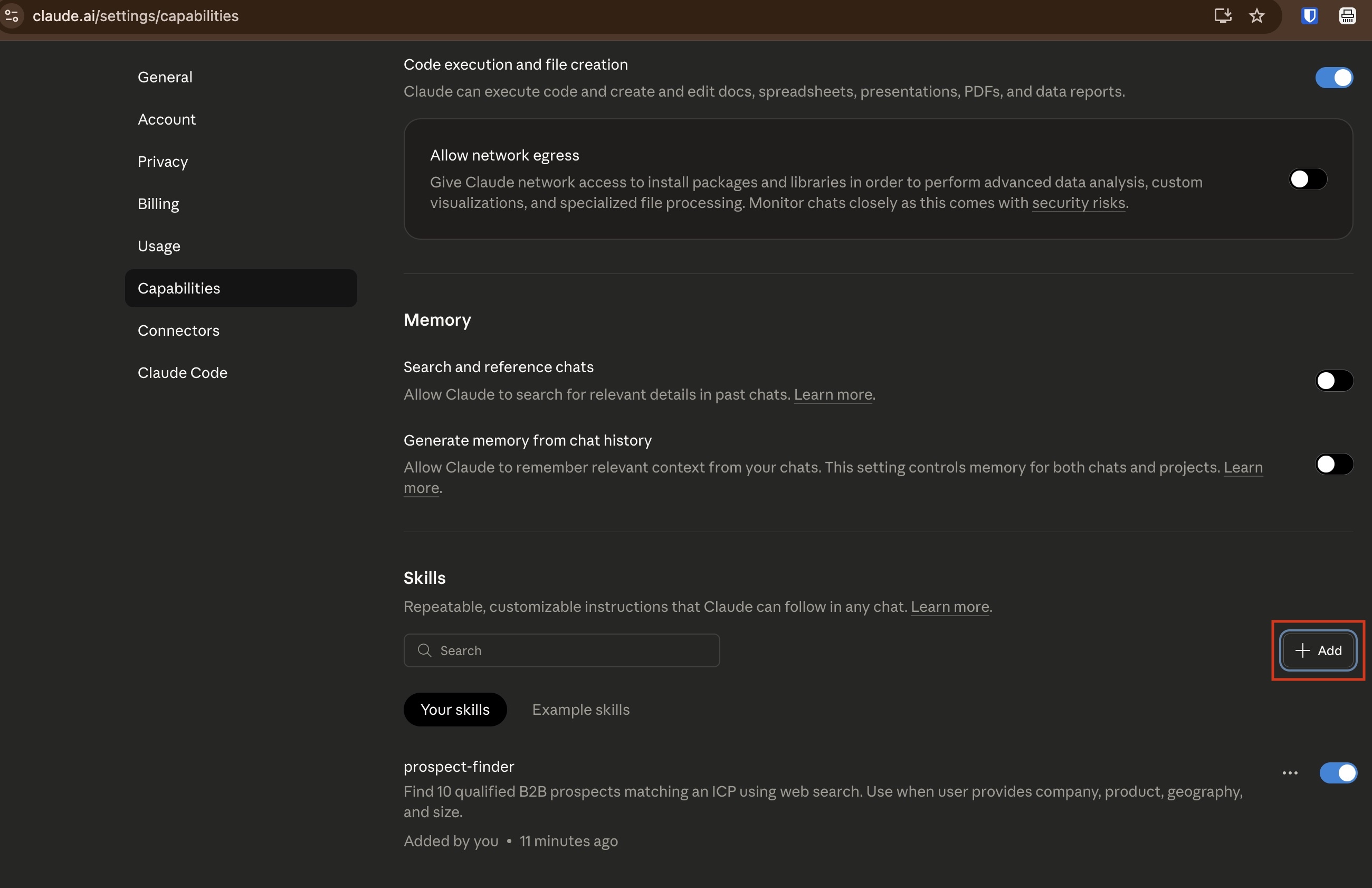
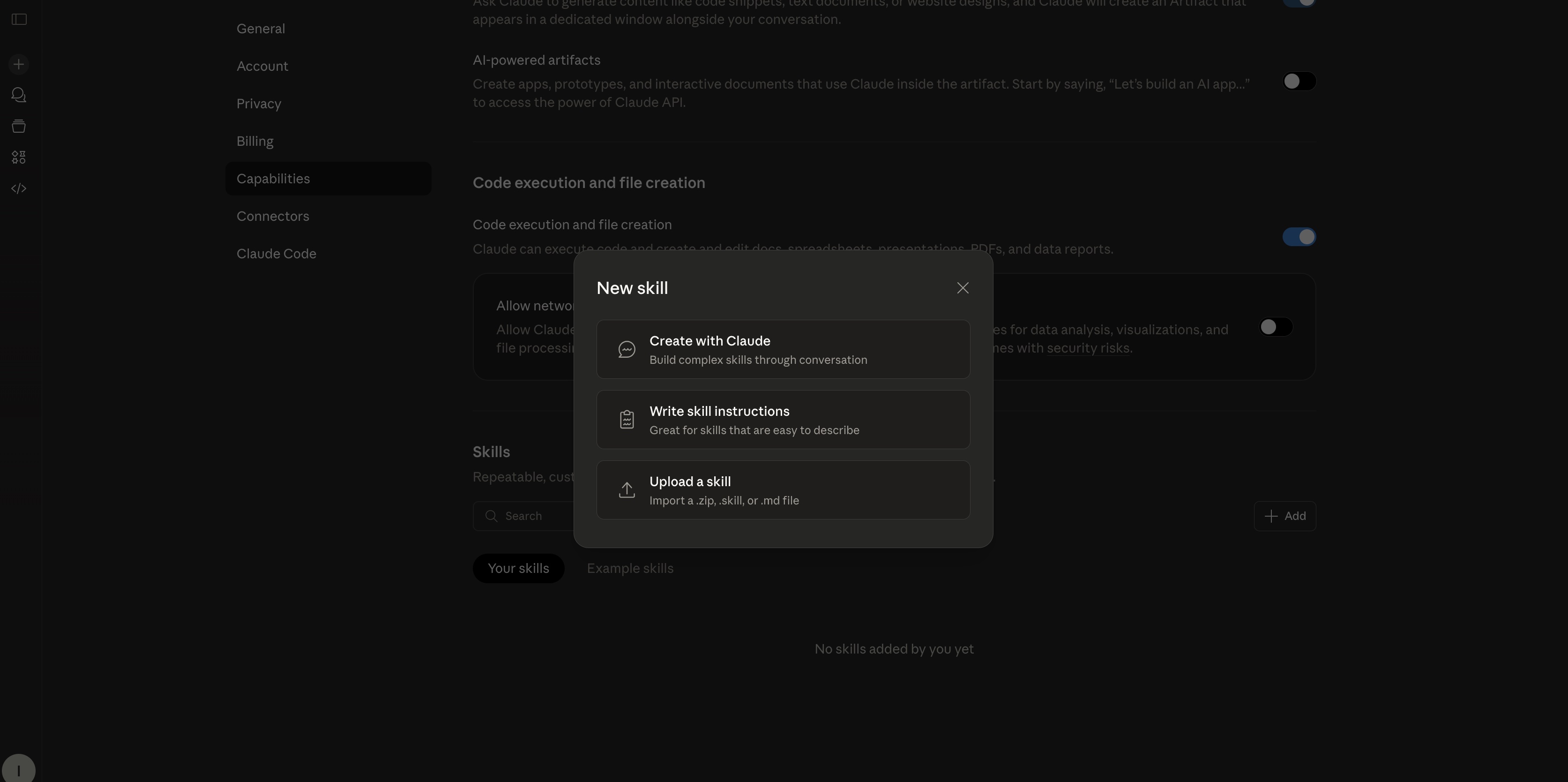
Then click on add to upload to create your skill.
Step 3: Create Test Cases
Good evaluation is crucial. Create a diverse set of test prompts that cover:
- Typical use cases: The bread-and-butter scenarios
- Edge cases: Unusual inputs or requirements
- Failure modes: Situations where previous attempts went wrong
- Variations: Different ways users might phrase the same request
Store these in an evals.json file alongside your skill:
{
  "evals": [
    {
      "prompt": "Create a quarterly sales report with charts",
      "files": ["sales_data.csv"],
      "expectations": [
        "Output includes a properly formatted document",
        "Charts are present and labeled",
        "Summary section exists"
      ]
    }
  ]
}
Step 4: Evaluate Results
There are two main approaches to evaluation:
Manual Evaluation
Simply run Claude with your skill on test prompts and review the outputs yourself. This works well for:
- Creative tasks where quality is subjective
- Small test sets
- Early iterations when you're still figuring things out
Automated Evaluation
For more rigorous testing, define specific expectations that can be checked programmatically:
- Did the output file get created?
- Does it contain required sections?
- Are specific formatting rules followed?
- Does it match a particular schema or structure?
Step 5: Iterate and Improve
Based on your evaluation, refine your skill. Common improvements include:
- Adding missing steps: Did Claude skip something important?
- Clarifying ambiguous instructions: Where did Claude misinterpret your intent?
- Providing more examples: Show the difference between good and poor execution
- Reordering steps: Sometimes the sequence matters more than you think
- Adding guardrails: Prevent common failure modes with explicit checks
Keep a history of your changes and the results they produce. This helps you understand what works and avoid regressing.
Step 6: Scale Your Testing
Once your skill performs well on a few test cases, expand your evaluation:
- Add more diverse test prompts
- Include real-world scenarios from actual usage
- Test with different types of inputs
- Run multiple times to check consistency
Advanced: Benchmark Mode
For production skills, you might want statistical rigor. Benchmark mode runs:
- All evaluation cases (not just one)
- Each test three times to measure variance
- Both with and without the skill to validate its value
- Cross-model comparisons to optimize performance vs cost
This produces confidence intervals and helps you understand when your skill truly adds value versus when Claude would do fine without it.
Best Practices
Do's
- Start simple: Get basic functionality working before adding sophistication
- Test early and often: Don't wait until you have a "complete" skill
- Document your assumptions: What context does this skill assume?
- Version your skills: Keep track of what changed and why
- Learn from failures: Failed tests are learning opportunities
Don'ts
- Don't over-specify: Leave room for Claude's judgment on minor details
- Don't test in isolation: Real usage often differs from test scenarios
- Don't ignore edge cases: They become common cases surprisingly often
- Don't skip evaluation: Gut feeling isn't enough for production skills
- Don't forget the user: Make sure the skill improves their experience
Real-World Example: A Document Formatting Skill
Let's walk through creating a simple skill for formatting markdown documents:
Initial draft:
---
name: markdown-formatter
description: Format markdown documents with consistent style
---

# Markdown Formatter

Format markdown documents with proper heading hierarchy,
consistent list formatting, and clean code blocks.
After testing, we notice Claude isn't handling nested lists well. We add:
## List Formatting Rules
- Use `-` for unordered lists
- Use `1.` for ordered lists
- Indent nested lists by 2 spaces
- Maintain consistent spacing between list items
After more testing, we realize code blocks need attention:
## Code Block Guidelines
- Always specify the language: ```python not just ```
- Add a blank line before and after code blocks
- Use inline code `like this` for short snippets
Each iteration makes the skill more robust and reliable.
Measuring Success
How do you know when your skill is "done"? Consider these metrics:
- Pass rate: What percentage of test cases produce acceptable results?
- Consistency: Do you get similar results across multiple runs?
- User satisfaction: Do people find the skill helpful?
- Time savings: Does it reduce back-and-forth iterations?
- Quality improvement: Are outputs noticeably better than without the skill?
Aim for at least 90% pass rate on your core test cases before considering a skill production-ready.
Conclusion
Creating skills in Claude AI is an iterative process that combines clear communication, systematic testing, and continuous refinement. The key is to start with a specific problem, draft initial instructions, test thoroughly, and improve based on real results.
Remember: a skill is never truly "finished." As you use Claude for new scenarios and edge cases emerge, you'll continue to refine and improve your skills over time. That's not a bug—it's a feature. The iterative nature of skill development means your tools get better with use.
Start simple, test often, and let real-world usage guide your improvements. Before long, you'll have a collection of skills that make Claude dramatically more effective for your specific needs.
Ready to create your first skill? Start by identifying a repetitive task you do with Claude, document the best way to do it, and begin the iteration cycle. You'll be amazed at how much more consistent and efficient Claude becomes with well-crafted skills guiding its work.
Related Blog


Ready to Build
Your Pipeline?